Free vs Paid Wedding Planning Tools and What Each Tier Actually Covers
Free wedding planning tools are built to keep you hooked until switching costs more than paying.
Most "free" wedding planning tools work the way a shopping mall directory is free: someone paid for the placement, and it isn't the couple reading it. This piece maps where each tier's walls sit, so you can decide whether to pay, switch, or combine tools before you hit a planning crisis mid-engagement.
Why "free" means something different in wedding planning tools
In most software categories, free means the company is betting on you converting to a paid plan later, or they're selling you ads. Wedding planning tools run a third model: the couple is the product, and the customer is the vendor paying for placement. The business keeps couples on the platform long enough to connect them with paying vendors, registries, or upsell moments, and the free plan is the mechanism that keeps couples there.
This isn't a bait-and-switch in the way a free trial is. A couple on one of these marketplace-funded platforms genuinely will not hit a credit card prompt for the core planning tools. The catch sits elsewhere. WedBuild's 2026 comparison of wedding planning apps states that vendor-directory platforms are "funded by vendor advertising, so featured results are paid placements, not quality rankings. So the free plan's vendor recommendations exist to move money toward advertisers, not to sort good florists from bad ones.
The practical upshot for couples: a tool with no paywall isn't automatically unbiased. The wall just moves. Instead of sitting between a couple and a feature, it sits between a couple and an honest vendor recommendation, and that's a harder wall to see because nothing on screen tells you it's there.
A different model exists alongside the marketplace-funded one: tools that charge a one-time payment and skip advertising. That structure changes the product's shape. When a couple pays once and the business has no vendor-advertising relationship to protect, the platform has no reason to keep them scrolling past sponsored listings. Wedbuild charges a one-time payment for optional upgrades on top of a free starting tier, with no subscription funnel. The idea behind that choice is that couples should pay only for features they actually use, not get steered toward monetised vendor recommendations, which is a direct rejection of the marketplace-funded structure most couples run into first.
Free tier features of a typical wedding planning tool
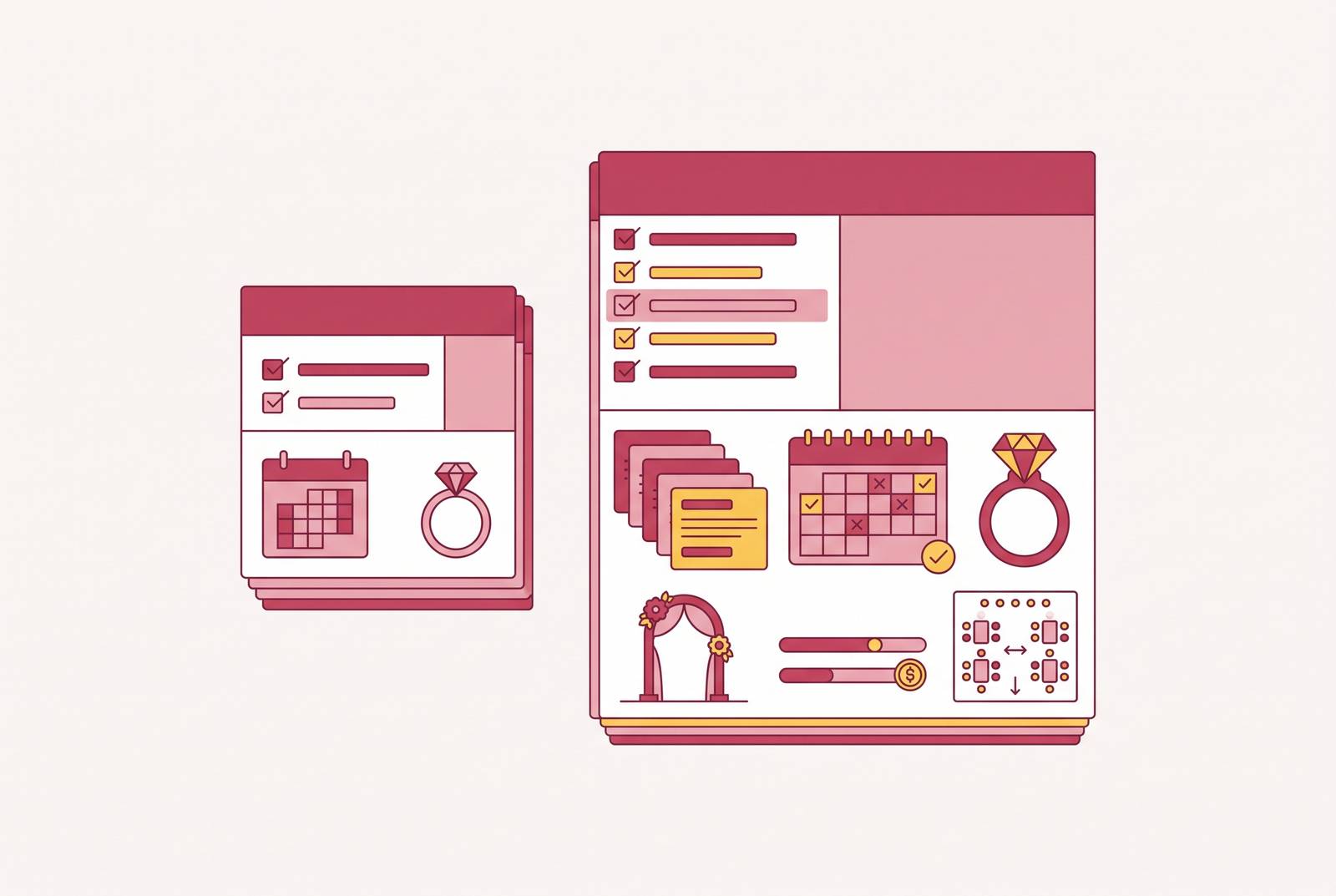
If you strip away the branding, most free tiers converge on the same handful of tools. Drawing from WedBuild's 2026 comparison of the category, free plans consistently include checklists and timelines, a guest list with online RSVP collection, and a wedding website builder. These are the basics every engaged couple needs in month one, and they cost a platform very little to give away.
What's missing more often than people expect is a budget tracker that actually works. It isn't a universal free-tier feature. WedBuild, for example, places its full budget planner with invoice and payment tracking behind its paid Standard plan, while keeping the core budget feature itself on the free tier, a split worth understanding before assuming "free" covers money management too.
Because free tiers are built to feel complete at the engagement stage, when a checklist and a rough budget genuinely do cover what a couple needs, couples don't notice what's missing until much later. The gaps appear later, once a couple is deep into guest list spreadsheets, vendor contracts, and seating logistics, and switching platforms at that point costs real time and real stress. Guest caps are the most common hard wall here. WedBuild's own comparison notes that it limits its free tier to 50 guests, and plenty of Australian weddings go past that number without trying.
Where Australian couples specifically hit the free tier's ceiling
Most of the globally recognised wedding planning tools were built for the US market first, and their free tiers don't just lack features for Australian couples. The numbers underneath them are often wrong.
Budget tools frequently default to US pricing, which has little in common with what weddings actually cost in Australia. WedBuild's 2026 comparison flags several concrete examples of this mismatch: cash registry features that require a US bank account and a US address, vendor directories with zero Australian listings, and a seating chart tool that only lives inside an iOS app, locked behind a paid unlock. A couple without an iPhone, or without a US address to register a cash gift against, hits a wall that has nothing to do with their guest count or their budget.
These ceilings appear at three specific moments. The first is when a couple opens the budget tool and the default numbers bear no resemblance to Australian vendor pricing. The second is when they go looking for a photographer or caterer in the vendor directory and find a list built for an overseas market, with none of the local cities they actually need. The third is when they open the seating chart only to find it locked behind a paywall, capped at a guest count they've already exceeded, or simply unavailable outside a specific app.
None of this is a matter of missing convenience features. A free tier built for the US or UK market can actively mislead Australian couples on what things cost, which vendors exist nearby, and what counts as normal practice for a wedding in this country. That's a structural problem with the data the tool runs on, not a cosmetic one.
A tool built locally sidesteps this mismatch for couples weighing platforms built overseas. Wedbuild is one such example: its budget planner defaults to AUD and local costs, its vendor comparison tools work with vendors couples have actually found nearby, and its seating tools aren't gated behind paywalls tied to a specific device or operating system.
What triggers a couple to pay
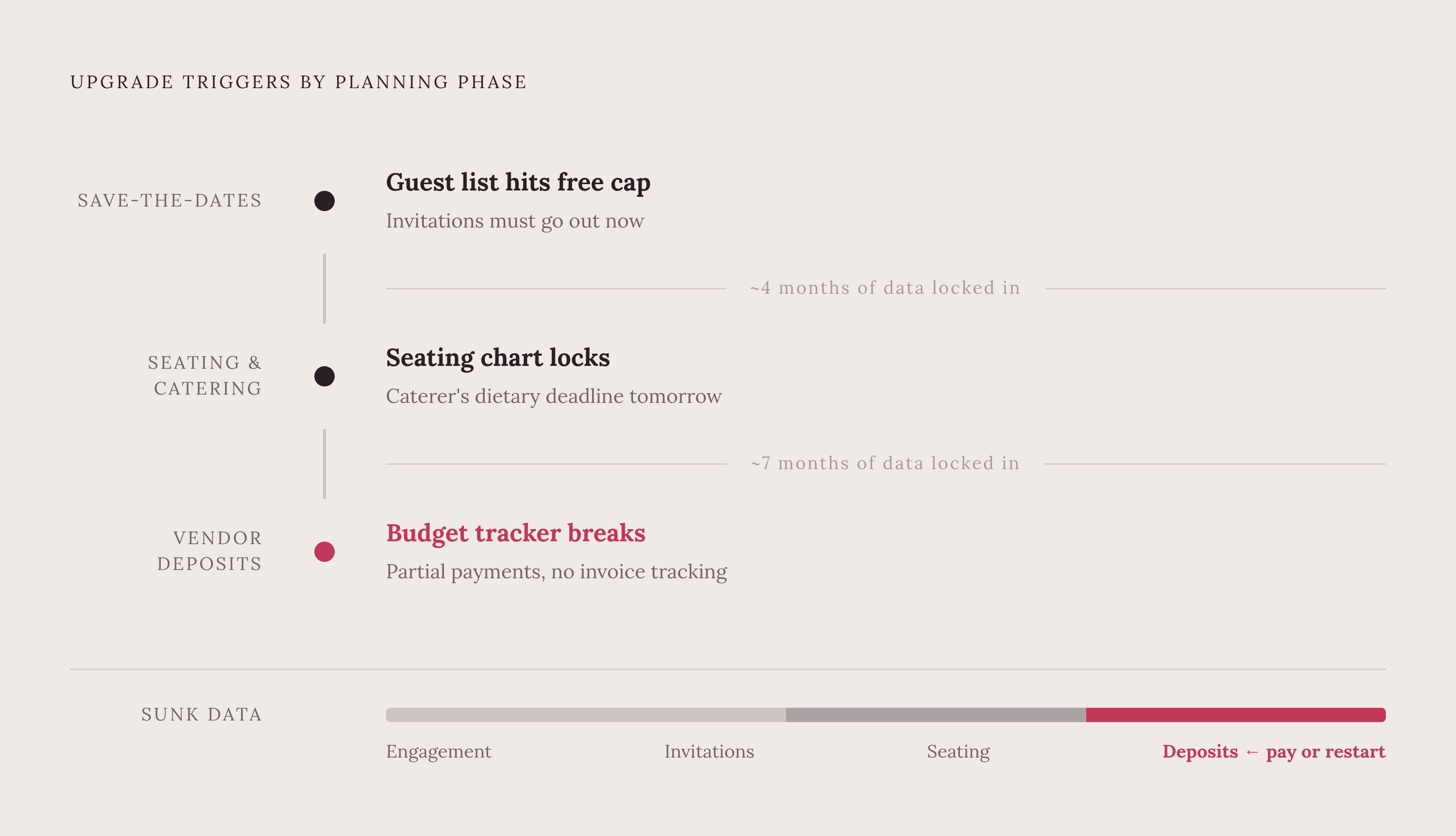
Couples rarely sit down and compare tiers side by side; they don't make a calm decision to upgrade. They upgrade because a wall appears at the exact moment switching platforms would cost more than paying does.
Three moments account for most of these triggers. The guest list exceeds the free cap right as invitations need to go out. The seating chart tool locks at the stage when dietary requirements have to be reconciled before the caterer's deadline. Once vendor deposits start landing in real amounts, the budget tracker can't keep up with partial payments or invoice tracking. Each of these lands during a high-stakes, time-pressured stretch of planning, precisely when a couple has zero appetite for migrating months of data to a new platform.
Free tiers are built to be adopted early, while planning still feels abstract and a checklist seems like plenty. By the time the real walls appear, months into an engagement, the cost of switching has grown high enough that paying feels like the only reasonable option, whether or not the price itself is reasonable. WedBuild's 2026 comparison names this risk directly, listing "no surprise paywalls at the stressful end of planning" as one of its explicit evaluation criteria. That a comparison needs to call this out as a standard at all says something about how often the market fails to meet it.
The fix isn't complicated, even if it runs against how most couples shop for these tools. Evaluating a platform's limits before signing up, rather than discovering them mid-engagement, avoids the reactive scramble. The sections that follow look at what that evaluation actually involves.
WedBuild's free tier and the additions in its one-time payment
WedBuild's free tier is built for a couple who wants to start planning today without handing over a credit card. The free plan includes a guest list with bulk spreadsheet import, online RSVPs with custom questions, a wedding website builder, a checklist, and an event schedule, all at no cost, as WedBuild's own comparison of the category shows. Drag-and-drop seating, vendor comparison tools, and structured dietary tracking through table cards are reserved for the paid tier.
The paid upgrade unlocks three things: invoice and payment tracking alongside the budget planner, the drag-and-drop seating chart under the Standard plan, and a visual room designer with a floor plan editor under the Pro plan. New accounts get seven days of the full Pro toolset for free, with no credit card required, before any payment comes into the picture.
How the paid tier's features connect matters more than any single feature. An RSVP updates the guest list automatically. The guest list feeds the seating chart. The seating chart prints table cards with dietary legends already attached and gives each guest a QR code to find their seat on the day. That's the kind of connected data flow the earlier sections identified as missing from most platforms, where the same guest's dietary note has to get typed into three different tools by hand. If the guest list, dietary requirements, and seating chart share one dataset, a couple can defer or remove the reactive upgrade moment altogether, because nothing needs re-entering or reconciling at the last minute.
The pricing model itself is part of the pitch. WedBuild is free to start, with a one-time payment unlocking the full product, and no subscription involved. So you avoid the mid-engagement price ambush described earlier, because no recurring fee creeps upward as the wedding date approaches.
WedBuild was built in Australia by founders who planned their own wedding, which isn't a marketing detail so much as an explanation for specific product choices: the AUD budget defaults, and the sync between dietary tracking and seating, both come directly out of problems the founders ran into themselves.
The comparison WedBuild publishes about its own product is unusually candid about where it falls short, and that candour is worth taking at face value. WedBuild has no vendor directory: it helps couples compare vendors they've already found elsewhere, not discover new ones from scratch. It also has no native mobile app, running as a web-based product used through a phone's browser. The free tier caps out at 50 guests, while the Standard and Pro paid plans, both one-time purchases, remove that cap. If you're planning a wedding larger than 50 guests, weigh that limit from the outset rather than discovering it once invitations are halfway out the door.
Ivory Lane: AI-powered budget forecasting at a one-time price, built for AU couples
Ivory Lane is one of two planning tools in this comparison built specifically for the Australian market, and it solves a different problem than WedBuild's integration-first approach does.
Ivory Lane also lets partners collaborate in a way many competitors don't match. Both partners can assign tasks to each other, keep a shared decisions log, and edit in real time with changes syncing instantly. That lets both people in a couple take genuine ownership of specific budget categories instead of one partner acting as the sole gatekeeper of the spreadsheet.
If your main source of planning anxiety is the budget itself, Ivory Lane suits you, because an AI model does the allocation math and catches overspending before it happens. But if your bigger worry is seating logistics and day-of coordination, a tool built around that problem serves you better.
The general-purpose free stack: what Google Sheets, Notion, and Canva can and cannot replace
Spreadsheets, project management apps, and design tools can cover most of wedding planning, and you pay nothing for them. Google Sheets handles a budget and guest list. Notion handles checklists and timelines. Canva handles invitations and a wedding website. None of these costs a cent, and for the right couple, that combination works fine.
Integration is the catch, and it's the same problem purpose-built tools exist to solve. Each of these tools does its one job well in isolation, but stitching them together means manually re-entering the same data across spreadsheets, documents, and design files. A dietary restriction entered in the guest list spreadsheet does not carry over to the design tool's table card. An RSVP response collected through a separate form doesn't update the Notion checklist. Every piece of data that needs to move between tools has to be typed in by hand, again, in a second place, and then checked against a third.
This stack suits a specific kind of couple: a small guest list, a high tolerance for manual reconciliation, and genuine enjoyment in building and maintaining their own system. But if you already feel behind on planning, you want one place where you enter a guest's dietary need once and it shows up correctly on the seating chart, the table card, and the catering order. For that couple, the hours spent manually syncing three free tools usually cost more than a one-time payment for a platform that connects the data automatically.
AI feature distribution across free and paid tiers in 2026
AI has become a genuine differentiator between free and paid tiers in wedding planning tools in 2026, but an AI feature is only as good as the data that trained the model behind it. If a budget forecasting tool trains on overseas wedding costs, it will give an Australian couple confident, specific, wrong numbers, the same way an overseas-built vendor directory lists nothing useful for a wedding in an Australian city.
That's the detail couples should check before trusting an AI feature with real money: not whether the feature exists, but whether it was built with data relevant to where the wedding is actually happening. Most AI wedding tools on the market in 2026 were trained on US data, and for Australian couples, that gap between what the AI predicts and what a vendor actually charges locally is the whole risk. Ivory Lane is built specifically for the Australian market, so it closes that gap in a way a general-purpose AI feature bolted onto a US platform cannot.